|
|
 |
|
Startseite : Computer-painting.com
Computermalerei ist eine neue Maltechnik. Wenn man anfängt mit dem Rechner zu
malen scheint dies unüberwindlich schwierig zu sein. In dieser Site finden sie deshalb eine Beschreibung der Mapix (Male Pixel) - Maltechnik , die das Malen mit dem Rechner wesentlich vereinfacht, eine
Computerbild-Galerie, mit speziellen Bildern: Digital Art Nouveau, und unter “Neu” ein brandneues Computerbild. Beobachten Sie den
Rechner-Virus “Wissler” bei der Arbeit.
|
|
|
|
|
|
|
|
>>> NEU : Das aktuelle Bild
|
|
|
|
>>> zur Galerie 1 >>>> zur Galerie 2 >>>zur Galerie3
|
|
|
|
Firstpage of Computer-painting.com
Painting with the computer is a new type of art. In this page, You will find the experience of an amateur-painter practisising this art. As
a result, You will find a gallery of different pictures, especially: Digital Art Nouveau. Watch the computervirus “ Wussler “ doing his work.
|
|
|
|
>>> NEW : The brandnew picture
|
|
|
|
>>> to Gallery 1 >>>> to Gallery 2 >>>to Gallery 3
|
|
|
Computer painting using “Mapix”:
- Mapix is the short form of :” Male Pixel” what mean’s:” Painting Pixel”.
- To painting with this methode means to use the painting tools in a way to give the pixels a file a direction . The ready picture than is the
sum of pixel directions.
- To gain this, we can use the tools the following way.
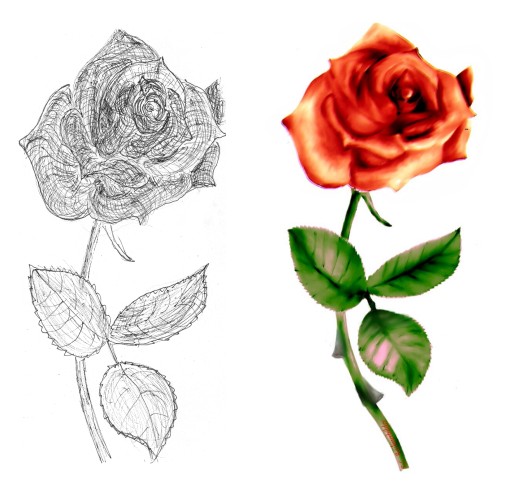
- Make a ball-pointer sketch, in xyz- 3 dimensional mode to show the spatiality.
- Scan this sketch into a file. (Or draw the sketch directly in a file, using the computer.) Fig.1
- Wipe out this sketch with a smear or blur or water tool, until a fine picture appears.
- Colorize with a colorizing tool.
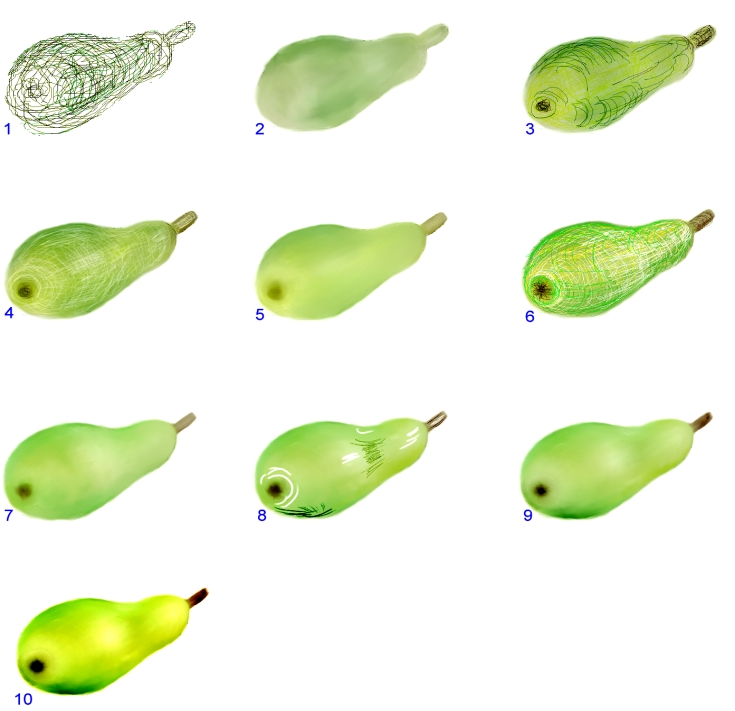
- Start a process of drawing, smearing, and / or wiping until the picture is nice. See the the technique on an yellow pear at Fig.3
- Make a fine correction using other colors.
- Make a copy of this picture and rework it with an other tool, to create an object picture.
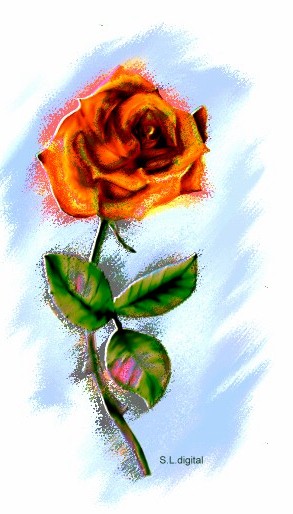
- Overlap picture1 and picture2 as objects until a nice picture appears. Fig. 2 shows the red rose after objectwork.
- The object can be an “emboss” picture too.
|
|
|
|
|
|
|
Fig.1 xyz-Skizze einer Rose Fig.2 Rose fertig
|
|
|
|
Fig.1 xyz-Sketch of a rose Fig.2 Rose ready
|
|
|
|
|
|
Painting using Mapix objects
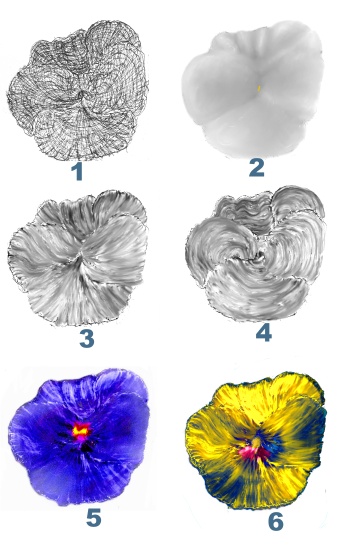
An exampel of painting a flower using objects, shows the technique of painting pixels and get spatiality and color effects using difference
objects.The technique is explained showing Fig.4:
- A Mapix spatiality sketch is made using a pencil. #1
- This sketch is wiped using a blender or water tool. #2
- This picture is enlightened using a dodge tool. #2
- A little noise may be added to make the flower a little velvetlike. #2
- A length spatiality picture is painted, using a smudge tool. #4
- A round spatiality picture is painted , using a smudge tool. #5
- #3,4 and 5 are colorized .( They may be painted in colors first too)
- The main picture #2 is merged and fixed in a file.
- Pictures #3 and 4 are added as difference objects.
- Fine tuning of the objects is made, using the transparency, the hue color, and the mapping tool to the same time to get a fine result. Fig #5
OR #6 ( At #5 the velvet is enhanced !)
- Paint the inner color using a Brush.
|
|
 |
|
|
|
Fig.4 Object example, Objektbeispiel
|
|
|
|
END: RETOURE ZUM ANFANG , RETURN
|
|
|
|
|
|
Malen unter Verwndung von Mapix Objekten
Das Beispiel von Fig.4 zeigt an Hand einer Blume, wie die ”Male Pixel” Technik unter Verwendung von Objekten benützt werden kann, um Räumlichkeit
und Farbeffekte zu erzielen:
- Eine Mapix Stift Zeichnung zeichnen #1
- Dieses Bild mit einem Blender oder Wasser, verwischen #2
- Licht und Schatten mit einem “dodge” Tool verbessern #2
- Dem Bild durch leichtes Rauschen ein samtiges Aussehen geben .#2
- Ein Bild der Längenräumlichkeit herwischen #4
- Ein Bild der Rundräumlichkeit herwischen. #5
- #3,4 und 5 einfärben .( Die Bilder können auch gleich farbig gemalt werden.)
- Das Bild #2 einschmelzen und Festhalten in einer Datei.
- Die Bilder #3 und 4 als Differenz Objekte drüber legen.
- Durch Feineinstellung von Transparenz, Farbe und Mapping das beste Bild herausholen.
- Den Mittelpunkt mit einem Pinsel malen.
|
|
|